A creative workshop
Your AI drafts the lyric, the brief, the prompt. Assist With Music keeps every attempt beside the prompt that produced it — so the verse you rejected is still evidence, not a lost draft.
● Live · assistwithmusic.com
Your AI can already recommend an album, explain why a chord change lands, build a playlist for a long drive, plan your practice, and help you make a song. Assist With Music gives all of that a lasting home, so it remembers the music you've found, the music you perform, and the music you direct with AI — and connects them.
What's inside
Three kinds of music
Found
Someone else's music, popular or obscure. Linked, never stored — kept for what you love, own, and put on playlists.
Performed
Music you play or sing yourself. Recorded, enhanced, and made ready to publish.
Directed
Music you make by directing an AI. Yours, with every prompt, take, and choice kept.
Your own music, performed or directed, plays right here on the site.
One example across the areas · Small questions add up
One evening
You tell your AI about a song you love. It's saved with why.
That month
Twenty loved tracks later, your AI knows your taste well enough to build playlists that surprise you.
That year
One of those songs becomes the piece you're learning, and another becomes the direction for a song you make.
Years on
You change AIs. The new one reads your taste, your collection, your practice, and your songs — and carries on.
Listening, learning, playing, and making music all work today with a connected AI.
Learn · the part people don't expect
Pick a style and you get the artists who defined it, the songs to hear it in, and where it came from — with Spotify and YouTube links, so you can learn a genre by listening to it. Free, no login.
It's also what your AI reads. Point it at a sub-genre and it writes with the real conventions, era and reference artists instead of guessing — edited and source-aware, not scraped. Ask a question mid-song and the answer files itself next to the song that raised it, privately.
24 worlds mapped so far, each branching into families and sub-genres. Free, no login.
Create · the deepest area today
Make your own music — performed by you, or directed with AI — and get it ready to release.
Your AI drafts the lyric, the brief, the prompt. Assist With Music keeps every attempt beside the prompt that produced it — so the verse you rejected is still evidence, not a lost draft.
Your AI runs the separation and loudness tools on your machine. Assist With Music holds the measurements, links each derived version to its source, and remembers why this one became the master.
Ask your AI a question mid-verse and the answer files itself against the song that raised it — sources attached, guesses marked as guesses, and never published anywhere.
Chats end; this doesn't. When a session stops it leaves the stage it reached, what blocked it, and the exact next step — so the next one starts working instead of re-reading your history.
Compare four takes without opening four tabs. Assist With Music counts what you actually played and how long you stayed — the clearest signal of which version is really the keeper.
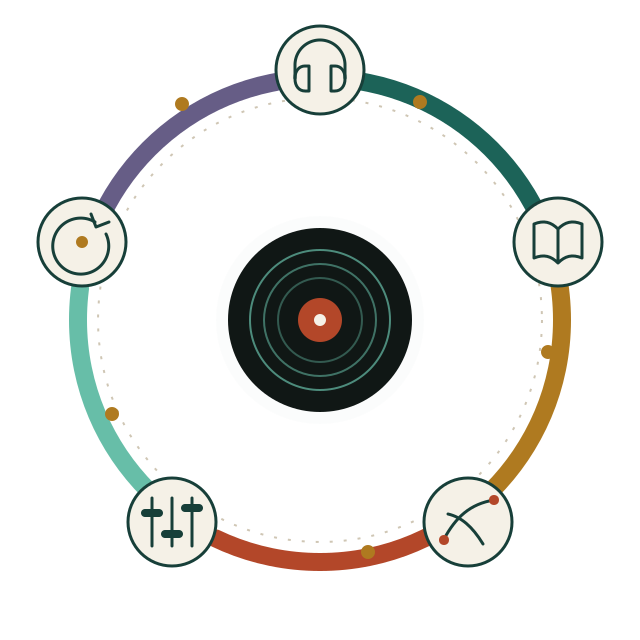
The Loop of Music Creation
Making music isn't a funnel — it's the same five moves, run again and again. Listening starts a song. Research changes an arrangement. A release starts the next thing you listen to.
Return to a sound, a person, a scene, a version, or a question.
Research sources, history, relationships and technique — and keep what you found.
Develop ideas, arrangements, versions and decisions toward a finished form.
Compare, collect feedback, plan the release, keep the unfinished work visible.
Pick up the next question or action without reconstructing the past.
The instructions, stage by stage
Every stage is a written loop your AI can read and follow — what to ask for, what good looks like, what to hand back. They aren't theory: they're the instructions that already carried real songs from a theme through generation, mastering and release, refined each time something went wrong.
So your AI doesn't start from a blank prompt. It starts from a method that has worked before, and Assist With Music keeps what it produces on the way through.
Listen · live today for your own takes
Whatever you've stored — a Suno link, a bounce off your own machine, a rough voice memo — plays right on the site. One track follows you across every page, and a queue keeps going while you work.
Now playing · in Assist With Music
Long Way Down — v4
Suno link · selected master
Ideas and Usage
“I love this song. Remember it, and why.”
“What is delta blues, and where should I start listening?”
“Help me learn this song I love on guitar.”
“Turn this public-domain hymn into an Appalachian folk song.”
“Write that down — do it next time you're at a computer with Suno.”
Reasonable questions
The boundaries, in plain terms. Open what you care about.
Everything in your musical life that your AI can help with: what you love and own, playlists, learning genres and artists, learning an instrument, and making music. Your AI does the thinking; Assist With Music keeps the record so the next conversation starts further along. All five areas work today with a connected AI; an enhance-and-publish path for recordings of yourself is still coming.
No. Many people will only listen, collect, learn, or play. Creation is one area — today the deepest one, because it was built first.
Whichever one you already pay for — ChatGPT, Claude, Codex, Gemini or something newer. Assist With Music doesn't pick a vendor and doesn't ask you to move. It connects over a standard authorized link and assists whatever is on the other end. What we can't promise is identical behaviour in every client; each one exposes a different amount of what it can do.
No. It gets the tools you authorize, inside the scope you set, and a switch you can flip off — turning it off blocks the next call, not just future sessions. Nothing it does becomes permanent authority: reading a brief isn't permission to rewrite it, and preparing a release isn't permission to submit one.
No — and that's deliberate. It isn't a generator and it isn't a DAW. Your AI generates with Suno and runs the audio tools on your machine; Assist With Music holds the prompts, the versions, the measurements and the reason you chose one take over another. Human-written songs and recordings that never touch a generator belong here just as much.
It assists the work of getting released — it doesn't press the button. Assist With Music holds the release plan, the masters, the track order, the credits and the evidence that each step happened, and the loops tell your AI exactly what a distributor will ask for. Your AI, on your machine and in your accounts, does the uploading and submitting; you approve it. Nothing here submits to a store on your behalf, and preparing a release is never permission to send one.
No. Assist With Music keeps the playlist, the reasons, and what you own. Your AI can use its own tools to act on a streaming service or a store if it has them and you ask.
Mostly where you put it — a Suno link, or a file on your own machine. Assist With Music plays those in place and keeps the portable part: names, versions, measurements, context and decisions. It is not a music locker, and your local file paths never travel into anything shared.
You mint a read-only link for that one song, album or project, and you can revoke it. It doesn't hand over your workspace, it doesn't make the recipient a collaborator, and it isn't publishing.
Never. The encyclopedia is separately edited and published; your workspace research is a different data path entirely. Nothing you or your AI writes gets promoted into it — not because it isn't good, but because a reference work needs one accountable editor.
No. Sharing a name and a login doesn't share data. AssistWithFinances can't see your songs and Assist With Music can't see your money. If a connection between two spaces ever makes sense, it has to name the data, the purpose and how long it lasts — and you have to agree to it.
No. The encyclopedia is free and needs no account, and the workspace is useful on its own — comparing versions, marking the keeper, planning a release. Connecting an AI adds help; it isn't the price of entry.
Assist With Music works with the AI you already use. Connect it once, then ask it about music the way you normally would — it will save what matters here.